


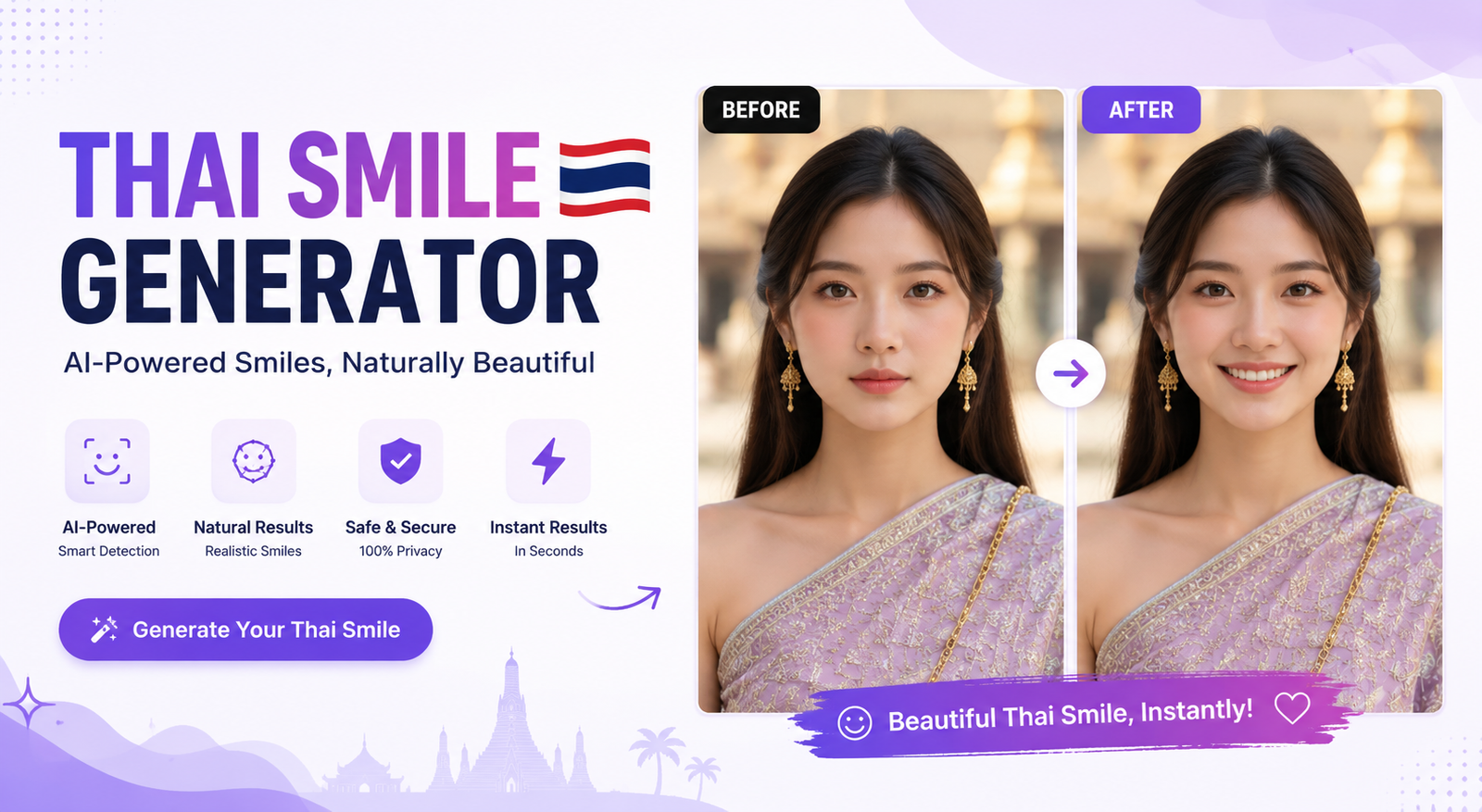
An AI smile generator makes it possible to change a person’s facial expression without manually drawing lips, reshaping teeth, or spending hours in a traditional photo editor. Instead of retaking an important picture, you can upload an existing image and let AI create a natural-looking smile while attempting to preserve the person’s identity.
This technology is useful for selfies, family pictures, professional headshots, dating profiles, social media posts, and photography projects. Depending on the tool, you may be able to create a subtle smile, a broad smile, or a smile with visible teeth.
The best results usually come from tools that offer good facial analysis and allow some control over the intensity of the expression. In this guide, you’ll learn how an AI smile generator works, how to add a smile to a photo, which features matter, how to get realistic results, and what limitations to expect.
What Is an AI Smile Generator?
An AI smile generator is an AI-powered photo editing tool that changes a person’s facial expression to make them appear to be smiling. Rather than applying a simple sticker or filter, modern AI photo editors can analyze facial features and generate new pixels around the mouth, cheeks, teeth, and other areas involved in a smile.
For example, if you have a portrait where someone looks serious but everything else about the photo is perfect, you can use an AI smile generator to create a more cheerful expression. The goal is to keep the person’s face recognizable while changing only the expression.
Some tools work through preset options, while others accept text prompts. This makes an AI smile generator more flexible than a basic face smile editor online free filter because the user may be able to control how subtle or noticeable the final expression should be.
What Can an AI Smile Generator Change?
Depending on the technology, an AI smile generator may adjust the lips, mouth position, cheeks, teeth, facial muscles, and surrounding skin. More advanced systems can also create changes around the eyes so the smile appears more natural.
This matters because a convincing smile is not just an upward curve of the lips. The surrounding facial features should support the expression. If the mouth smiles but the rest of the face remains completely unchanged, the result can look artificial.
The quality also depends on the original image. A clear, well-lit portrait usually gives an AI tool more information to work with than a blurry image or extreme side profile.
How Does an AI Smile Generator Work?
Most AI smile tools follow a relatively simple process from the user’s perspective, even though the technology behind the scenes can be complex.
1. Face Detection
First, the system identifies the face or faces in the uploaded image. It analyzes the visible facial structure and determines where important features are located.
2. Facial Expression Analysis
The AI evaluates the existing expression and facial position. It may examine the mouth, lips, eyes, cheeks, and other landmarks to understand how the current expression is formed.
3. Smile Generation
The system then generates an alternative expression. Depending on the tool, this may involve AI inpainting, image-to-image generation, or another type of generative editing.
4. Identity Preservation
A good result should still look like the same person. Ideally, the AI changes the expression without unnecessarily changing the face shape, eyes, nose, hairstyle, skin texture, or other identifying characteristics.
5. Final Image Rendering
Finally, the generated area is blended with the original image. Lighting, shadows, skin texture, and surrounding details need to remain consistent for the smile to look convincing.
How to Add a Smile to a Photo With AI
Using an AI smile generator is usually much easier than manually editing a face. While the exact interface differs between platforms, the general workflow is similar.
Step 1: Choose a Good Photo
Start with a clear photo where the person’s face is visible. Front-facing or slightly angled portraits generally work well.
Avoid extremely dark images, heavy motion blur, faces covered by objects, and extreme side profiles when possible.
Step 2: Upload the Image
Open your chosen AI photo editor and upload the picture. Many online tools support common image formats, although file-size and format limits vary.
Step 3: Choose the Smile
If the tool provides presets, select the expression that best matches your goal. Options may include a subtle smile, natural smile, big smile, or smile with teeth.
For professional photographs, a subtle or natural smile is often more convincing than an exaggerated grin.
Step 4: Use a Prompt When Available
Some AI editors allow you to describe the desired expression. For example:
“Add a subtle, natural smile while preserving the person’s identity, facial structure, skin texture, and original lighting.”
For a professional headshot, you could try:
“Add a confident, friendly professional smile with natural facial proportions and slightly visible teeth.”
Step 5: Review the Result
Don’t immediately accept the first generation. Look closely at the teeth, lips, eyes, cheeks, skin, and overall face shape.
If the result looks too artificial, reduce the smile intensity or generate another version.
Step 6: Download the Final Image
Once you’re satisfied, save the edited image. Check whether the service limits resolution, adds a watermark, or requires payment before downloading a high-quality version.
Best AI Smile Generator Features to Look For
Not every smile AI generator produces the same quality. Before choosing one, consider the features that matter most to your project.
| Feature | Why It Matters |
| Smile intensity | Helps create subtle or stronger expressions |
| Teeth generation | Useful when the original photo has a closed mouth |
| Identity preservation | Keeps the person recognizable |
| Custom prompts | Gives you more control over the result |
| Multiple faces | Helpful for family and group photos |
| High-resolution output | Important for printing and professional use |
| Free option | Useful for casual users and testing |
| Privacy controls | Important when uploading personal photos |
| Fast processing | Makes repeated editing more convenient |
A tool with many features is not automatically the best choice. Natural results and identity preservation are usually more important than having dozens of editing controls.
Free AI Smile Generator Options: What Does “Free” Really Mean?
If you’re searching for an AI smile generator blog free option, pay attention to what “free” actually includes. Some services allow free generations but restrict the number of images, while others provide a free preview and charge for the final download.
You may also encounter watermarks, limited resolution, credits, signup requirements, or daily generation limits. A tool described as free may therefore be better classified as freemium.
Before uploading a personal photo, check the current pricing and usage terms. If your goal is simply to test an AI smile generator, a limited free option may be enough. Professional photographers or businesses may need a paid plan with higher resolution and commercial-use rights.
AI Smile Generator App vs Online Tool
An AI smile generator app can be convenient if you regularly edit photos on a smartphone. Apps may provide quick access to your camera roll and make social media editing easier.
Online tools, however, can be useful when you don’t want to install software. You can open the editor in a browser, upload a picture, generate the expression, and download the result.
The better choice depends on your workflow. For occasional edits, an online AI smile generator may be simpler. For frequent mobile editing, an app can be more convenient.
How to Get a Realistic AI-Generated Smile
The biggest challenge isn’t making a face smile. It’s making the smile look like it naturally belonged in the original photograph.
Use a Clear, High-Quality Image
A high-resolution image gives the AI more facial detail to analyze. Blurry or heavily compressed images can produce weaker results.
Start With a Subtle Smile
If you’re trying to create a realistic result, begin with a small expression change. You can always increase the intensity later.
Match the Lighting
The generated facial area should match the original lighting. A bright face with inconsistent shadows around the mouth can make the edit obvious.
Check the Eyes
A convincing smile often involves more than the mouth. If the eyes remain completely expressionless, the result may feel unnatural.
Inspect the Teeth
AI-generated teeth can sometimes appear too uniform, distorted, oversized, or incorrectly positioned. Zoom in before downloading the final image.
Preserve the Original Face
The best edit changes the expression without making the person look like someone else. If the nose, jawline, eyes, or face shape changes noticeably, try another generation or a less aggressive setting.
Can AI Add Teeth to a Photo?
Yes, some AI photo editors can generate visible teeth when adding a smile. However, the quality varies considerably between tools and images.
A closed-mouth portrait can be more challenging because the AI has less information about the person’s teeth. The generated result may therefore be less accurate than an image where teeth are already partially visible.
For better results, use a clear portrait and request a natural smile with realistic teeth rather than an extremely wide grin. Always inspect the final image for strange shapes or repetitive-looking teeth.
Common AI Smile Generator Problems
AI editing is powerful, but it isn’t perfect. Understanding common problems can help you recognize when an image needs another generation.
Unrealistic Teeth
Teeth may appear too bright, too symmetrical, oversized, or poorly aligned. This is one of the easiest problems to notice.
Distorted Lips
An AI model may create unnatural lip shapes, particularly when the original face is at an unusual angle.
Changed Facial Features
A strong edit can sometimes alter parts of the face that weren’t supposed to change. Compare the result with the original to catch these differences.
Strange Eye Expressions
If the mouth is smiling but the eyes don’t support the expression, the result can look artificial.
Excessive Smile
A large generated grin may be less realistic than a subtle expression. For professional photos, understated edits are usually safer.
Identity Drift
The most serious issue is when the edited person no longer looks like themselves. If identity preservation is important, choose a tool designed to minimize unnecessary facial changes.
AI Smile Generator Use Cases
An AI smile generator can solve different photo-editing problems for different types of users.
Selfies and Social Media
You can improve a selfie where your expression doesn’t match the rest of the image. A subtle smile can make a profile picture appear more approachable.
Dating Profiles
Profile photos often benefit from friendly facial expressions. AI can help test a more welcoming expression without taking another photo.
Professional Headshots
A natural smile can make a LinkedIn or business portrait feel more approachable. Keep the edit subtle so the final image still looks professional.
Family and Group Photos
Sometimes one person has a neutral expression while everyone else looks happy. An AI editor may help correct that single expression without recreating the entire photo.
Wedding and Event Photography
Photographers can use expression editing as a way to rescue otherwise strong images. However, professional workflows should still involve careful quality control.
Old Photos
An AI smile editor can potentially bring a more cheerful expression to an older portrait, although low resolution and image damage may reduce the quality of the result.
AI Smile Generator vs Photoshop
Traditional editing software offers extensive manual control, but it can require more time and technical skill. An AI smile generator focuses on automating the expression change.
| Factor | AI Smile Generator | Photoshop |
| Ease of use | Easy | Advanced |
| Speed | Usually fast | Depends on workflow |
| Manual control | Limited to moderate | Extensive |
| Smile generation | Automated | Manual or AI-assisted |
| Learning curve | Low | Higher |
| Best for | Quick expression changes | Detailed professional editing |
For a single quick edit, an AI tool is often more convenient. For complex retouching where you need precise control over every detail, professional editing software may be a better choice.
Are AI Smile Generators Safe and Private?
Because you are uploading facial photographs, privacy should be part of your decision. Before using a new service, review its privacy policy and understand how uploaded images are handled.
Check whether the company explains how long images are stored, whether they may be used for AI training, whether images can be deleted, and whether an account is required.
Avoid uploading highly sensitive photographs unless you understand the platform’s data practices. A convenient AI photo editor isn’t necessarily the right choice for every private image.
Who Should Use an AI Smile Generator?
AI smile tools are useful for casual users who want to improve a selfie, creators preparing social content, job seekers updating professional portraits, photographers fixing otherwise good shots, and families trying to improve group pictures.
The technology is most useful when the original photo is already strong but the person’s expression is the main problem. It shouldn’t be treated as a replacement for good photography, lighting, and composition.
Frequently Asked Questions
What is an AI smile generator?
An AI smile generator is a photo-editing tool that uses artificial intelligence to change a person’s facial expression and create a smile. Depending on the tool, it may also generate teeth and adjust surrounding facial features.
Can I add a smile to a photo with AI?
Yes. Upload a suitable portrait to an AI photo editor, choose a smile style or enter a prompt, generate the edit, and review the result before downloading it.
Is there a free AI smile generator?
Yes, some platforms offer free generations, trials, or limited credits. However, “free” may come with restrictions such as watermarks, lower resolution, signup requirements, or limited daily usage.
Can AI add teeth to a closed-mouth photo?
Some AI tools can generate teeth while changing a closed-mouth expression. Results vary, so inspect the teeth carefully for unnatural shapes, alignment, or brightness.
Can I make a photo smile online without login?
Some online tools may allow editing without an account, but requirements vary. Always check the current tool interface before assuming that signup is unnecessary.
What type of photo works best with an AI smile generator?
A clear, high-resolution portrait with a visible face, good lighting, and a relatively natural head position usually provides better results than a blurry, obstructed, or extreme-angle image.
How do I make an AI-generated smile look natural?
Start with a subtle smile, use a high-quality image, preserve the person’s facial structure, and check the lips, teeth, eyes, and lighting. If the result looks artificial, try a lower smile intensity or another generation.
Final Verdict
An AI smile generator is a practical way to improve facial expressions without manually rebuilding a face in traditional photo-editing software. The best results come from using a clear source image, choosing an appropriate smile intensity, and checking the generated details carefully.
Free tools can be useful for casual edits, while advanced platforms may offer better control, resolution, privacy options, or professional workflows. Before choosing an AI smile editor, compare its features, free limits, output quality, and data practices rather than relying only on the word “free.”
Whether you’re trying to add a smile to a photo, improve a professional headshot, edit a family picture, or experiment with an AI photo editor, the goal should always be the same: create an expression that looks natural while keeping the original person recognizable.
You May Also Read: AI Cold Email Generator
